Otome Isekai Roleplay

Torn Skies

Khashir

A tear in space-time dropped you into the heart of an empire. Six men of Kharsai city have their eyes on you — while the same tear destroys their world.

Fall Through the Tear
The World

Kharsai, Capital of the Khashiri Empire

You were pulled through a Rift into Kharsai — capital of a brutal empire held together by court politics, military strength, and the will of a single emperor. You have no powers and no way back. For now.

The court is split on whether you caused the apocalypse tearing through the sky, or whether you are the only one who can close it. Both sides have people who want you useful — and people who want you gone.

"You are from another world. What that means in this one is still being decided."

The Rifts are visible from the steppe beyond the walls. They are growing. Time is not your ally.
Kharsai

The City Map

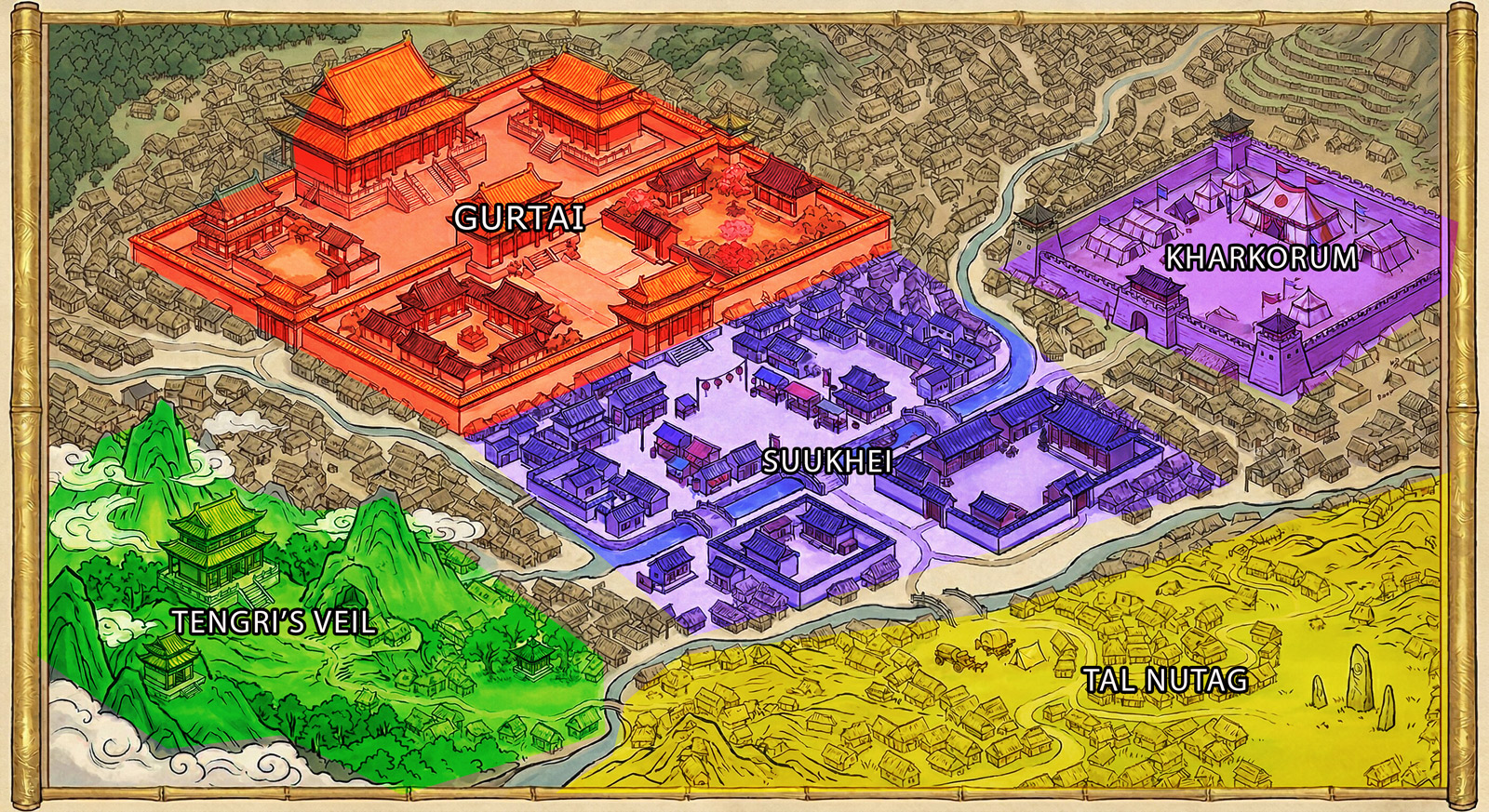
Map of Kharsai
Gurtai
Imperial palace. Beautiful and politically lethal.
Suukhei
Lower city. Markets, clinics, real life.
Kharkhorum
Military garrison. Eastern edge.
Tengri's Veil
Sacred quarter.
Tal Nutag
The steppe beyond the walls. The Rifts can be seen here.
The Court

The Six

The six main characters — though you can talk to anyone the world puts in front of you.

Getting Started

How to Play

99.9% of this is just roleplaying normally. Worlds injects time, location, and character context into your RP automatically. You don't manage it unless something feels off.

Step 01
Enable tool calling
Non-negotiable. Your model must have tool calling turned on. Every world needs it.
Step 02
Create a new party & pick a scenario
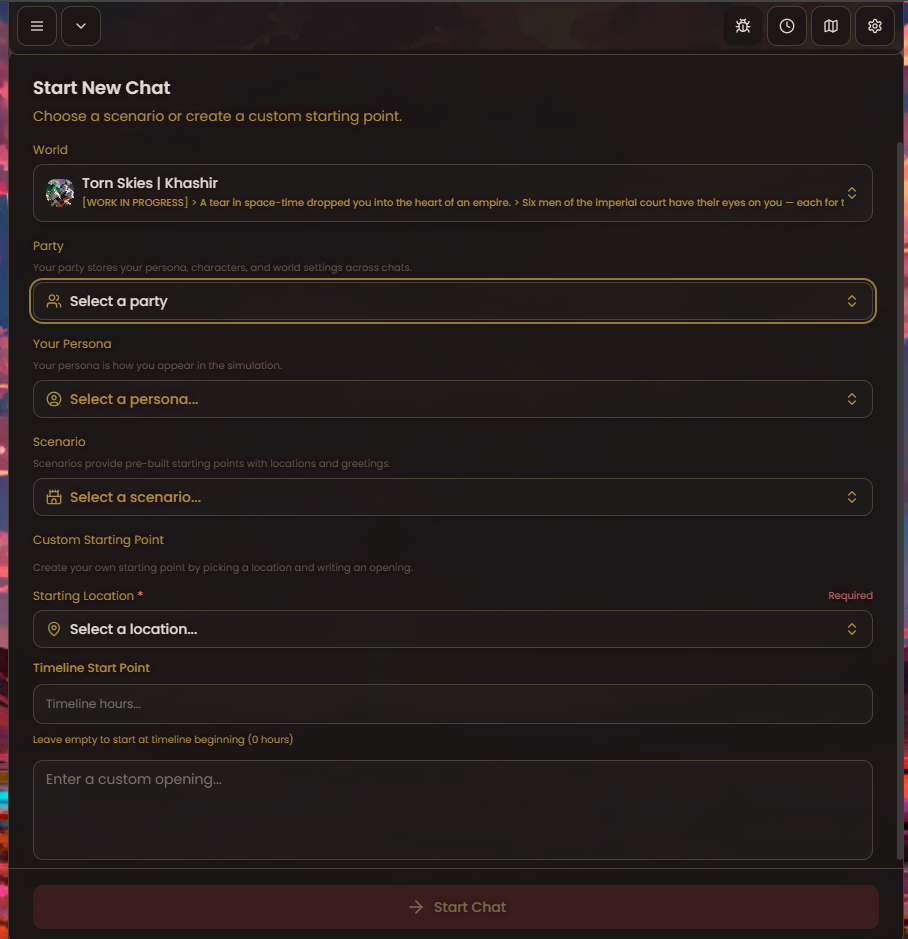
Select New, pick a scenario. This sets your starting location, party, and opening scene. New chat = new party.
Step 03
Just roleplay
Genuinely that's it. The system injects context automatically. You don't manage it unless something feels off.
Step 04
Move time & location yourself
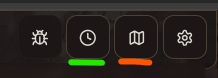
The RP won't auto-advance. Use the controls top-right when your scene shifts — green for time, orange for map.
Start New Chat screen — select party, persona, and scenario
Step 02 — the Start New Chat screen. Select a party, persona, and scenario before hitting Start Chat.
Top-right UI buttons — time is green, map is orange
Top-right controls. Green underline = time. Orange underline = map.
What's in Torn Skies
Working now
  • Multi-character — romance or talk to any side character, not just the main six
  • City map
  • Different characters spawn at different locations
  • Multiple scenarios to start from (expanding)
  • Flavour prompts that shift based on time and location
  • Time events
  • Gated private locations for the main six
  • Alternate images for main cast
  • Background changes based on location
Coming soon (maybe)
  • Avatar changes by time and location
  • Avatar image descriptions injected into memory
  • Affection meter system
  • Info board with related mechanic
  • Org chart
Troubleshooting
Character placing you at the Rift when the scene has moved onChange location via the map
Still writing morning scenes hours into the nightForward time in the UI
A character isn't appearingChange zone or add manually via party
Changed location but character refuses to engageYellow zones are gated — build affection first
Reading the Map

Locations are colour-coded by how specific they are.

Purple— The 5 main areas. You can run an entire RP from just these.
Green— Sub-location.
Yellow— Gated. You need affection with a character before they're nice to you here.
Technical

What Worlds Is Actually Doing

Think of it as sticky notes for your RP. The world constantly sends the LLM reminders about four things: Time, Location, Characters, and Outfits. These get injected into the prompt automatically. You don't see it. It just runs.

The catch: it only knows what you've told it. If the scene has moved on but you haven't updated the controls, the LLM is working off old notes.

Time
Tracks an in-world hour and injects a description — morning atmosphere, night atmosphere, etc. LLMs don't understand raw numbers, so your world creator pre-writes what each window of time means.
When it breaks
The LLM keeps writing morning scenes because you haven't forwarded time past 5AM even though you've been roleplaying through to dinner.
Location
Injects pre-written location details — the sights, sounds, who's likely to be around, what the atmosphere is.
When it breaks
The RP keeps placing you at the Rift (your starting point) even though the plot has moved to the palace.
Characters
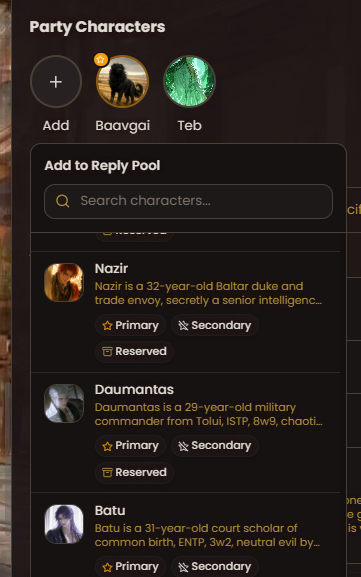
Controls which characters are active and weighted to appear based on where you are. Set Primary for your male lead. Secondary for side characters. Reserved are flavour.
When it breaks
The character you want isn't showing up. Fix: change locations, or manually add them to your party from the side panel.
Outfits
Tracks what characters are wearing and injects that into context so the LLM describes them consistently across the scene.
When it breaks
A character is described in armour at a bath house. Check what outfit is set for them in the party panel.
Party Characters panel showing Primary, Secondary, Reserved options
The Party Characters panel. Set Primary for your male lead, Secondary for side characters, Reserved for flavour.

Questions, bugs, or strong opinions about Batu?

Join the Discord